Storage type is one of the most overlooked factors when choosing a dedicated server — yet it directly affects application speed, database performance, and how quickly your server handles real-world load. Here's how NVMe, SSD, and HDD actually compare.
The Three Storage Types Explained
HDD (Hard Disk Drive)
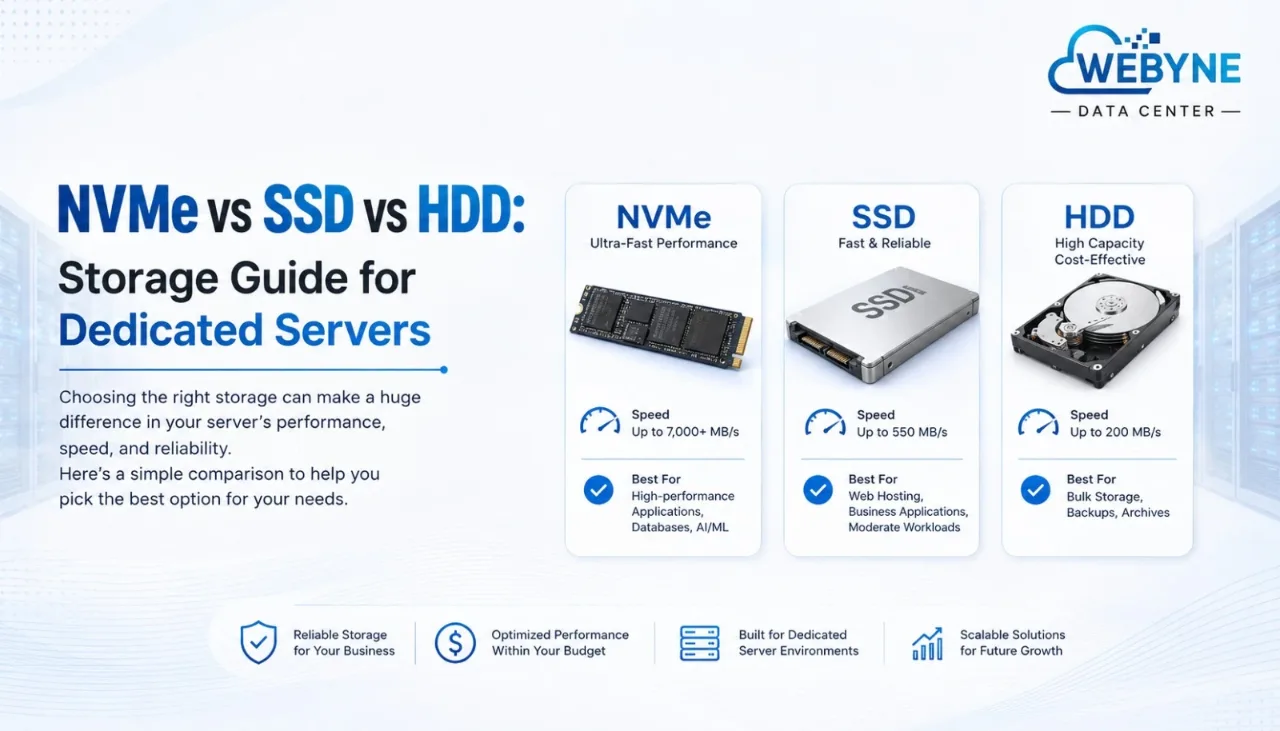
Traditional spinning-disk storage. Cheapest per gigabyte, but significantly slower than solid-state options due to mechanical read/write heads. Rarely recommended as primary storage for a modern dedicated server, though still occasionally used for bulk backup storage.
SSD (Solid State Drive)
Flash-based storage with no moving parts, offering substantially faster read/write speeds than HDD. SATA SSDs remain a solid, cost-effective option for general-purpose hosting.
NVMe (Non-Volatile Memory Express)
The fastest widely available storage type, connecting directly via the PCIe bus rather than the older SATA interface. An NVMe dedicated server delivers dramatically lower latency and higher throughput than SATA SSD, particularly for random read/write operations common in databases and high-traffic applications.
Speed Comparison
- HDD: Typically 80–160 MB/s
- SATA SSD: Typically 500–550 MB/s
- NVMe SSD: Typically 2,000–7,000+ MB/s, depending on the generation and interface
This isn't a marginal difference — an NVMe dedicated server can offer 5–10x the throughput of a comparable SATA SSD setup, which translates directly into faster page loads, quicker database queries, and shorter backup windows.
Why NVMe Matters for a Dedicated Server
1. Database Performance
Databases perform constant small read/write operations. NVMe's low latency dramatically reduces query response times compared to SATA SSD or HDD.
2. Application Load Times
Web applications, especially those with large codebases or frequent file access, load noticeably faster on NVMe storage.
3. Faster Backups and Restores
Since NVMe handles high throughput so well, scheduled backups complete faster, minimizing the performance impact during backup windows.
4. Better Handling of Concurrent Requests
High-traffic applications serving many simultaneous users benefit from NVMe's ability to handle many concurrent read/write operations without the bottlenecks common on slower storage.
When SATA SSD Is Still a Reasonable Choice
For lighter workloads — smaller websites, low-traffic applications, or budget-conscious projects where NVMe's cost premium isn't justified by actual performance needs — SATA SSD remains a solid middle-ground option, still far ahead of HDD.
When HDD Still Makes Sense
HDD storage is rarely the right choice for primary application storage today, but it remains cost-effective for bulk, infrequently accessed data — archival backups, large media libraries, or logs that don't need fast retrieval.
Choosing the Right Storage for Your Dedicated Server
- Database-heavy applications: NVMe is strongly recommended
- High-traffic e-commerce or SaaS applications: NVMe is strongly recommended
- Standard business websites with moderate traffic: SATA SSD is often sufficient
- Bulk backup or archival storage: HDD can be a cost-effective supplementary option
Final Thoughts
Choosing between NVMe, SSD, and HDD for your dedicated server comes down to matching storage speed to your workload's actual demands. An NVMe dedicated server delivers a meaningful performance advantage for databases, high-traffic applications, and anything latency-sensitive — while SATA SSD remains a reasonable, more budget-friendly option for lighter workloads.
Want an NVMe-powered dedicated server for your project? Explore Webyne's dedicated server plans , all built with enterprise-grade NVMe storage as standard.